Author Archives: Robbert Bloem

If I say that I know something, what exactly do you think I know?

Case 1: MS Word

Recently I was updating my resumé and stumbled upon an old problem: do you include that you know software like Word? When you ask around you hear two opinions: half of the people say “yes, why not?” and the other half answers “no, it looks stupid”. My question is really different: if I say that I know Word, what exactly do you think I know?

  • I know how the icon looks like
  • I know how to type text and save a document
  • I even know how to make text bold
  • I mean damnit: I emailed you a good-looking resumé, I didn’t send you a handwritten one by carrier pigeon. Isn’t that a clue that I know Word? (1)

When somebody says they know Word I at least expect them to be good at it. They should be able to make templates and macros and stuff like that. In that case: do I know Word? Not really.

Case 2: MS Windows

Today we got an email at work for an introductory course in a programming language. Prerequisites: knowledge of Microsoft Windows and flow charts. Let’s repeat the exercise: what do you want me to know about Windows?

  • There is a big “Start” button in the lower left corner (2)
  • If you can find Control-Alt-Delete on your keyboard, you’ll be fine
  • It is named after what you will throw your computer through after a frustrating afternoon (3)

Clearly, I’m a Windows-expert. Or do you want me to do hacks in the registry? In that case… nope.

Case 3: Greek

Somebody: “Do you know Greek?”
Me: “Sure”
S: “Can you read it?”
M: “Sure, this is pi, that is a delta and there is an h-bar”
S: “H-bar? Can you really read Greek?”
M: “Sure, it is all over the place in physics textbooks”
S: “Sigh…”


(1) If we are nitpicking: that is not completely true, I wrote my resumé in Pages. That is also why it is good-looking

(2) If you don’t give a version I assume it is still Windows XP

(3) I learned “windows, the operating system” before “windows, the rectangular thingies that you can look through”. When somebody says “windows” I still first think of computers

LaTeX syntax mode for Coda 2

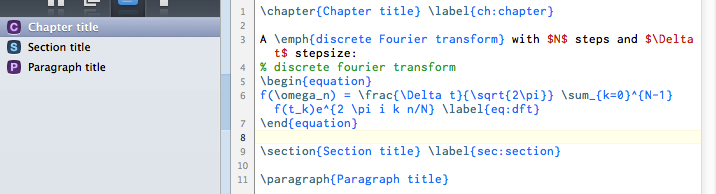
I adapted the LaTeX.mode that comes with SubEthaEdit 3.5 for use with Coda 2. The LaTeX.mode was originally developed by Michael Barber. To use the LaTeX mode, first download the mode file, then drag the unzipped file to Coda 2 in the dock. That’s all!


Latex.mode for Coda 2.

The looks of the LaTeX mode. It includes chapter/section/paragraph markers (left) and syntax highlighting. Code folding is also supported.

The mode can be customized. A description of the format is given here, but it does not fully apply to Coda 2 syntax highlighting. Justin Hileman describes how “colors” are replaced by “scopes”. Unfortunately I couldn’t find a good description of which scope applies to which color. In the Colors panel in Preferences there is a list with colors and description, but these descriptions are not the names of the scopes. The scope names and their color values (but not the descriptions found in the Preferences) can be found in the “Coda Bright.sss” file in the “Coda 2.app” package. Not very elegant.

Michael Barber did a really nice job of making a LaTeX-mode that went beyond the normal syntax highlighting, complete with LaTeX compiling scripts and a fancy way to do the commenting. I don’t think it can be used in Coda 2 (at least not as it is) but I left it in the package, maybe somebody else can give that a crack.

After making the mode file I found out that Coda 2 doesn’t support Versions (1). Unfortunately, that is a deal breaker for me. I’m writing my thesis and the effortless way to find back old iterations is really super convenient. In this case ‘not using the mode actively’ probably also means ‘not maintaining the mode actively’, but if you have comments, please let me know and I’ll see what I can do.


(1) I mean the Time-Machine-like feature where you can compare a document with earlier versions, introduced by Apple in Lion. It is actually surprisingly difficult to find on the Apple website or on the web. The latter is mainly because ‘Versions’ is very generic. But I don’t understand that Apple doesn’t make a big deal out of it. Unlike iCloud or iMessages it works and is useful.

New online photo album

Short version:
I have a new site for my photos, which can be checked out here. I should work better on mobile devices… Let me know if you find issues!

Long version:
While I do like to share my photos with others, I always found it difficult to find an easy and nice way to do so. I’m looking for an easy and mostly automated workflow to do four things:

  1. Post-processing of the photos: changing the light levels, cropping etc. I do this in Lightroom
  2. Organize the photos: some photos won’t go online, I want to give them titles etc.
  3. Make a website: not only generate some code, but also resize the pictures.
  4. Upload the website: preferably in such a way that you don’t have to re-upload everything all the time.

There different tools that can do this/parts of this:

  • Google Picasa: this program can do all four steps, but is flawed. The post-processing is not as professional as Lightroom and the website does not look very attractive. Another point is that you upload the pictures to Google, which I’m hesitant to do.
  • Adobe Lightroom: it is already a database of all your photos and it actually has some features to make a site of the pictures, but it makes one site of one event, not an album of several events.
  • Apple iPhoto: I used to use this and put the site on MobileMe, but Apple screwed me/us and removed the feature a year or so ago.
  • JAlbum: as a solution after iPhoto/MobileMe I used JAlbum. It is actually a very powerful program that does steps 2-4. It also has problems though. My oldest gripe is that it just feels bad: it is slow and it feels a bit foreign on my computer. I could sort of live with that, until I recently found out that it doesn’t work very well on iPads and iPhones. (1)

Something had to be done and if there is not a good solution out there, I would have to do it myself. This was the beginning of December. I spend some time looking for a solution, but ultimately didn’t find one. (2) I decided to spend the second week of my Christmas holidays to making a website.

I decided to focus on steps 2 and 3. Lightroom is a few orders of magnitude more complex and I’m happy with it. The smart uploading should solve itself if I do step 2 and 3 correctly. In the last few days I wrote a program (script) to do these steps. Step 2 involves making some sort of database with all the information, the challenge of step 3 is not so much compiling the HTML-code, but to make a good-looking website. Most of New Year’s Day I spent on making something nice in HTML and CSS. I also tried a bit of JavaScript, but decided that it wouldn’t be worth the effort.(3) I’m not really into web development, but it was nice to do.

For the database and compiling the website I used Python – my go-to language for doing anything more complicated than adding 2+2. For a second I doubted if I should write a Cocoa-program (native Mac), but I’m not good enough with it to make something useful in a few days. On January 2nd I spent time to figure out how to set it up. Like a good self-taught programmer, I decided to use separate classes for the album, events and photos.

In a different project I also used classes but that approach did not work now – quite frustrating. Lets say we have a child and a parent. The parent has a property “family name”. In the old project I had a school class and although it was useful to have a parent-class with the family name property, all the kids had different parents. They all inherited the family name property, but they did not share a common parent. Changing the family name of all the kids or of all the parents does not make a difference. For this photo site project I have a single parent (album or event) with a boatload of kids (events or photos). Now it would be nice to change the family name only once! I’m still not convinced that the way I did it is the best way, but it works.

On January 3rd I finally spend time to bring it together. At dinnertime I had something that worked (put in some pictures and make a website). It was a bit of a proof-of-principle that I can do it and quite a mess. I rewrote the whole thing directly and around midnight I was happy.

The fourth I spend time to make it work good. Squashing bugs by adding more events and photos to the album. Making the resizing work better, adding the exif-data to the photos etc. This morning I started to make the real album. Around lunchtime I uploaded it and then spend the afternoon improving the HTML code.

I’m quite excited about it as it makes it really easy for me to take a bunch of photos, organize them for the website and get them online. Exactly what I wanted! The collection of scripts are called “Hummingbird”.(4) and can be found on Github. It would be really cool if people have feedback.

(1) they also switched from a free model to model where you either have to pay or your site gets slammed with ads. I don’t mind paying for software, but only if I like it.
(2) I’m wondering why. I guess the market is very small. Most normal people use Facebook or Picasa. Professionals have their own highly customized solutions (usually with Flash websites that work crappy and work even worse than JAlbum on iPads and iPhones (as in: not). That leaves a small selection of nerds who want to host the photos themselves. On the other hand: that is exactly the market that should be able to create something themselves… right?
(3) I also suspect that JavaScript is the reason why JAlbum works so bad on iPads. JavaScript can do fancy things when you “mouse over” an element, but a touchscreen does not have a mouse. But I’m not an expert.
(4) An earlier attempt to do this was called “Mockingbird”, but it turned out it was the wrong bird.

January 4th

Friday 04/01/2013:

  • 8:00: ugh, awake too early
  • 8:15: going to watch “wie is de mol?”, a Dutch game show where people have to play games while one person tries to sabotage it. The real point of the show is to find the saboteur (the mole). At the end of each show, the persons have to fill in a questionnaire and the person who knows least is kicked out.
  • 8:30: the participants should be ‘famous’ Dutch people, but I don’t recognize anyone
  • 8:45: it used to have ‘normal’ Dutch people as participants, which was better because they were not acting, like the actors who play the game now
  • 9:00: the problem with the show is that the video editing can completely mislead you. Last year everybody was convinced that the mole was one person, but it turned out to be somebody else. All participants try to look like the mole, because then other participants will make mistakes in the questionnaire and will be kicked out.
  • 9:15: I couldn’t tell you who is kicked out. I saw it, but I have no clue who it is.
  • January 3rd

    Thursday 03/01/20123:

  • 10:00: still getting used to typing 2013 instead of 2012
  • 10:10: no updates yesterday. I was working on the new photo site, but frankly it was a bit frustrating. I found a solution to the problem at 21:00 or so… Now continuing…
  • 10:20: clear sky. Sun is shining. Sitting behind the computer I’m getting blasted by the sun. Almost too hot. Also: hard to see the screen. Always something to complain!
  • 10:30: ah, the “iTunes Christmas present” of today is from The XX. I liked the original album better than the remixes on the single (always something to complain!), but still, nice!
  • 11:15: video of New York City firefighters on their way to a fire in 1920. The car scenes remind me of the chase in The French Connection.
  • 11:30: LOL, the Netherlands is expecting the first dry weekend since September
  • 12:00: okay, I should have shut up about the good weather here and laughing about the Dutch weather. Clouds are a-coming.
  • 12:15: on my way to the city
  • 12:30: for the last four years I travelled past a shop called ‘sauberbraut’ (beautiful bride). I still think it reads ‘sauerkraut’. It is also white, I guess.
  • 12:45: there is a C&A (cheap clothes store from the Netherlands ) in Zurich. That is convenient because I don’t have to think where to buy my underpants etc. A guy I knew bought fashionable expensive underpants, each if which was more expensive than my complete collection. Now here to buy new pjs.
  • 12:30: it starts raining, just when I’m in front of the Apple store… Lets check out the new iPad Mini.
  • 12:45: size and weight: great. No retina display: not tempted to buy it. I have no need for it, but that’s another story.
  • 23:30: I’m getting hungry, is it already dinner time? Oh shit… To busy making this new photo site.
  • 23:45: I got the site working around 18:00, but then I decided to clean up the code and essentially start over. Of course, now I could reuse most of the old code so it is much quicker.
  • 0:00: Oh yes! It works.
  • 0:15: uploading the site, always a surprise how it looks like when you’re not looking at the local version and on different browsers
  • 0:30: if you are interested, you can find the (beta version) here